Creating Viral Videos with Seedance 2.0: Five Key Applications
Seedance 2.0 is redefining the accessibility and efficiency of AI video creation. From accurately replicating character movements to generating bulk user-generated content (UGC) videos, this tool showcases its powerful practicality across five core scenarios. This article delves into how it achieves multimodal input integration, bringing new workflows to content creators and marketers.
The launch of ByteDance’s new video generation model, Seedance 2.0, has created a significant impact in the AI creation sphere, challenging similar products in the industry.
Recently, I have watched hundreds of videos generated by Seedance 2.0 and identified the five most representative and practical core application scenarios. Let’s break them down one by one, so you can quickly get started!
01 Accurate Replication of Character Movements
The first and currently most popular application is the accurate replication of movements. A significant portion of the viral Seedance 2.0 demonstration videos focuses on this feature: using custom characters and scenes to 1:1 replicate the actions and expressions from reference videos.
The operation logic is straightforward: simply upload a custom character image, a scene image, and a reference video of character movements from a movie. The model can accurately map the facial expressions and body movements from the reference video onto your custom character, ensuring smooth actions and consistent character representation, effectively addressing common issues in AI video such as character distortion and movement misalignment.
AI video example effects are as follows:
Moreover, it can seamlessly integrate with large language models like Kimi 2.5: first, use the large model to generate scripts, storyboards, and key frames, then utilize Seedance 2.0 to complete the movement replication and video generation, creating a complete animation workflow that requires no professional background.
02 Generating Website/App Promotional Videos
The second highly practical application scenario is the production of promotional videos for websites and apps. Seedance 2.0 excels in generating dynamic effects for product promotional videos.
You only need to provide product interface screenshots and a few clear creative prompts to generate a smooth, professionally animated promotional short video.
This is a game-changer for startups and independent developers with limited budgets who cannot afford professional dynamic design teams. Compared to traditional production processes, its generation speed is faster, and the production cost is almost negligible. The purely AI-generated visual quality meets the basic commercial promotional needs.
With Seedance 2.0, you don’t need to write a single line of code, debug complex animation parameters, or repeatedly modify keyframes. As long as you can articulate your ideas clearly, you can generate the expected promotional animation, truly achieving “what you think is what you get.”
03 Generating Story Shorts from a Single Image
The third application scenario is a boon for animators and enthusiasts—uploading an image to generate a complete narrative short film. With just one reference character image, you can create a 15-second animation featuring multiple camera angles, natural transitions, and matching high-fidelity voiceovers with background music.
For example, given the following reference image:

Provide the model with a detailed scene and plot description, and it can intelligently expand into a complete story scene based on the reference image, automatically supplementing supporting characters, props, and environmental details that align closely with the plot. The camera language flows naturally, avoiding the common abrupt transitions and disjointed visuals seen in previous AI videos. The generated AI video case effect is as follows, sourced from @尾鳍Vicky.
Does this mean that the technical barriers of traditional animation studios are being broken down?
Even if you have never systematically studied animation production, cannot draw, or do not know how to adjust keyframes, as long as you have creativity and ideas, you can become the director and animator of your own story.
04 Batch Generation of Real Person UGC Marketing Videos
The fourth core scenario is the batch generation of real person UGC content, a necessity for e-commerce marketers. Those who have done e-commerce know that UGC videos are crucial for driving traffic and conversion, but traditional shooting is costly and often struggles to ensure consistent output efficiency.
Many previous AI video models either failed to ensure the consistency of product appearance and details or produced digital characters with stiff expressions, mismatched lip-syncing, and awkward body movements, falling short of commercial standards.
For example, given the following reference image:

The generated AI video case effect is as follows:
Seedance 2.0 addresses these industry pain points: the generated real person on-screen videos feature natural expressions, smooth body movements, and perfectly matched lip-syncing and dialogue, with product details and texture presentation being highly consistent, creating an effect nearly indistinguishable from real-life shooting.
This highly realistic UGC video can quickly bridge the gap with users and establish consumer trust, bringing significant traffic to products.
Using Seedance, you can also generate videos with product placements, using engaging effects to attract users. As long as you have creativity and product selling points, Seedance 2.0 can produce high-quality marketing videos in bulk.
05 Multimodal Input Integration
The last scenario is not a specific application case but represents the most core and easily overlooked technical breakthrough of Seedance 2.0.
Those familiar with AI video generation know that most mainstream models in the industry, whether domestic or international, only support a limited combination of input types and cannot achieve synchronous recognition, understanding, and integration of all modal materials.
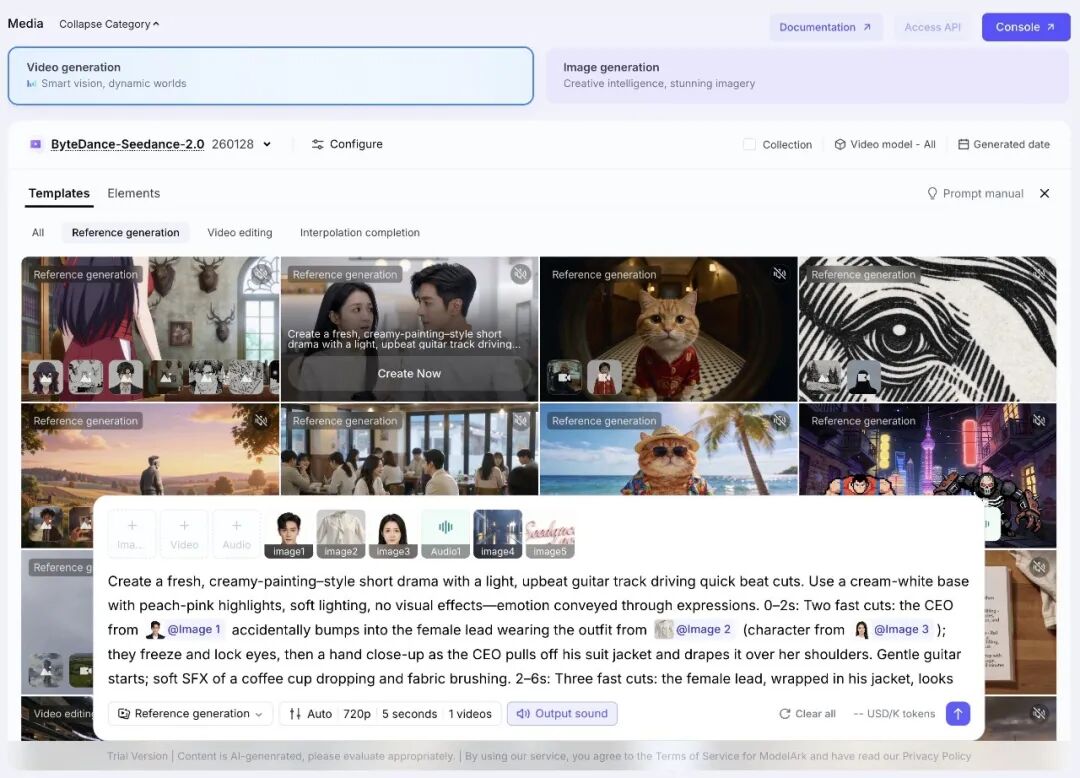
Seedance 2.0 can accept text descriptions, character reference images, action reference videos, background audio, and voice dialogue all in one prompt. The model can recognize the core information of all materials at once, accurately integrating all creative requirements to produce a complete, coherent, and expected final video.
Inputting all creative materials at once eliminates the need for step-by-step processing of visuals, actions, and sounds, and avoids switching between multiple tools for exports, allowing for the direct generation of the final product. This not only simplifies the operation process but also revolutionizes the logic of AI video creation.
In summary, these are the five representative core application scenarios of Seedance 2.0. Whether you are an individual creator, a media person, or part of a startup team or corporate marketing department, you can find suitable applications for your needs.
As a newly released large model, the capabilities of Seedance 2.0 extend far beyond these applications. If you discover other interesting and practical application scenarios, feel free to share in the comments and unlock more possibilities for AI video creation together!
Comments
Discussion is powered by Giscus (GitHub Discussions). Add
repo,repoID,category, andcategoryIDunder[params.comments.giscus]inhugo.tomlusing the values from the Giscus setup tool.